
Most organizations prioritize security and manageability when it comes to their employees’ web browsing experience. One common method to achieve this is by implementing policies that restrict certain actions, such as installing extensions, in web browsers like Microsoft Edge. This can be done by utilizing the “control which extensions cannot be installed” policy, which allows admins to block the installation of specific extensions.
By leveraging the wildcard option in this policy, organizations can block all extensions in one full swoop in Microsoft Edge. This level of granular control ensures that only approved and secure extensions are accessible to employees, reducing the risk of malicious or incompatible extensions compromising the browsing environment.
GPO (Group Policy Object) and Intune settings catalogue are two popular tools that organizations use to enforce such policies. So, whether it’s through GPO or the Intune settings catalogue, organizations have the means to effectively control which extensions can or cannot be installed in Microsoft Edge, safeguarding their browsing environment. (screenshots below)


This policy is the reason why you’re missing the Copilot icon in Microsoft Edge. Your first thought might be “Well, I’m not getting rid of that policy!” Don’t worry, I felt the same way. But there is a solution, and it’s pretty simple. However, it’s not well documented, even by Microsoft.
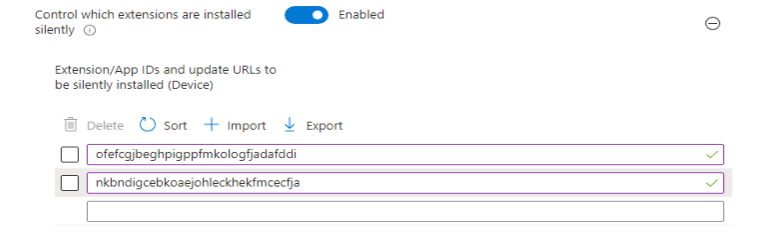
To fix this issue, you need to tweak or apply a policy called “Control which extensions are installed silently”. This policy requires you to enter the extension App IDs that you want to allow. For Copilot, you need to enter these two IDs: “ofefcgjbeghpigppfmkologfjadafddi” and “nkbndigcebkoaejohleckhekfmcecfja”. The reason is that the Copilot icon is actually an extension for Microsoft Edge, and by blocking all extensions from being installed in the browser, you are also blocking Copilot. This can be done via GPO or Intune (screenshots below).

After you apply the policy and restart your Microsoft Edge browser, you will be delighted to see that the Copilot icon has appeared in the top left corner of the browser. This icon will allow you to access the Copilot features and enhance your browsing experience.
 DroidKid